Costikyan’s alternative
But I wanted to comment on some of the side-issues Greg’s talk raises. Slide 9 makes an arresting argument:
- Leisure time activities set as an adolescent, followed as you age
- Anyone who’s been a teenager since 1982 has been exposed to games (that’s why almost no one over 35 plays games - but many 35 and under do)
- In 30 years, demographics of game players will match demographics of population as a whole
Greg’s post also reminds me of my frustration that games are too long. A movie is $10 for 2 hours of fun. A game is $50 for (in theory) 30+ hours of fun. But most people I know get bored of games in less than 20 hours, the rest is wasted. I’d rather games were shorter, cheaper, and more varied. But the economics of the industry make that tough. The $50 price point is fixed by development costs, and they don’t get much cheaper for a shorter game. And if the consumer pays $50 they expect 30+ hours of gameplay. So we’re stuck with an industry that makes long, expensive games.
The good life
This JPEG goes to eleven
Photoshop’s JPEG code is bad software.
I’m a longtime Gimp user. But
lately I’ve been playing around with RAW images and colour profiles,
and Gimp does badly with those. So I’m giving Photoshop Elements a
free
trial.
I mostly like it, but its JPEG saving is insane. Not only does Photoshop not use the same 0-100 quality scale that all the other tools I know use, they have two different ways to save JPEG, with different scales. Neither work right.
I have a picture, a portrait from my Digital Rebel XT. It’s 3456x2304 and about 9 megs as a PNG. If I convert it to jpeg using cjpeg -q 75, the baseline for JPEG creation, it’s a 580k file. OK, all well and good.
If I try to use Photoshop’s “Save for Web”, the quality slider lets me choose 0–100. I set it to 75 and the resulting image is 1.4 megs! That’s about like a cjpeg 92. OK, so they have a different scale. Fine. But no matter what I do I can’t get a 580k file out of the tool. A quality of 50 yields 554k, a quality of 51 yields 677k. Why the giant jump? Shifts to 49 or 52 don’t yield nearly as much a difference. To make matters worse, “Save for Web” leaves out all your EXIF data. And the tool gives you dire warnings about 8 megapixels being too big an image. Um, right.
The normal “Save as..” in Photoshop is a bit better. The JPEG option has a quality slider, too, but this one goes from 0–12. Because you know, 12 is better than 10. Generating a 580k file is still impossible. Given there’s only 12 quality steps that’s not too surprising. But there’s still a giant jump: quality 8 is 607k, quality 7 is 400k. What’s going on?
I guess I shouldn’t be this fiddly about JPEG settings, but I’m truly mystified as to what Photoshop is doing. cjpeg gives a nice smooth quality/size tradeoff with lots of fine grained adjustments right in the middle of the sweet spot. Photoshop seems to make it impossible to control the same tradeoff. No wonder so many online images are poorly compressed.
Technology Review
Scientific American used to be a great magazine, but a few years back
they made an editorial decision to become
less
nerdy, more sensational, less interesting. Technology Review has
somewhat filled the gap for me, although the new editorial policy is
way more business oriented than I would prefer.
The June 2005 issue had a few interesting bits in it. Larry Lessig has a good free culture essay. And Howard Anderson, of Battery Ventures, has a somewhat shocking essay on why he no longer wants to be a VC.
That was the old way, and it was tons of fun, and we all made too much money. I’ll miss it. But now the markets are too rational, and the returns are too small and uncertain. So, time to leave.
And while it’s in the July issue, I can’t help but quote this zinger:
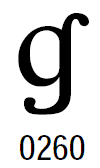
Typing Unicode on Windows
- In HKEY_Current_User/Control Panel/Input Method, create a key “EnableHexNumpad” and set the value to REG_SZ, “1”. Do it manually, or use this registry file.
- Reboot (yes, you have to)
- Hold down alt, type numpad +, type a 4 hex digit code (263a, 0041, whatever), release alt.
6912 Languages
I’ve been a happy user of the Ethnologue database for
years. It lists all languages of the world in a simple database form.
Just yesterday I did a search for
Malagasy
ethnologue to learn that Malagasy is a language of Madagascar.
It’s a lot of fun to browse, skipping from country to language to
country as you follow immigration patterns.
The New York Times today has an interesting article about Ethnologue, on the occasion of the publication of the new version of the database. I had no idea the database was developed by Christian missionaries! In retrospect that makes perfect sense, just like LDS maintaining the best geneaology data. Sometimes religious fervour has practical benefits. I also didn’t know Ethnologue is the source for the three letter language codes we use in internationalized software, soon to be ISO 639-3.
Don’t miss the NYT’s visualization of language distribution. I love the NYT graphics; this one is by David Constantine.
Blue light special at Hogwarts
I preordered the new Harry Potter book
months ago. I was surprised to get this email from
Amazon today:
In related news, you can steal the new book electronically if you like reading OCRed pages. A torrent of an audiobook version (lovingly read by a robot, one presumes) has 2000+ downloaders.
Guilty of everything
Go playing as epic comic
Hikaru No Go
is a great Japanese manga. It’s the story of an elementary school boy
who discovers an ancient Go board inhabited by the spirit of an expert
Go player from Japan’s feudal past.
The comic deftly tells stories that combine the pressures of being a young kid, the nuances of the game of Go, and anime-style epic battles. It makes playing Go seem incredibly cool. The art is awesome: see some samples here.
The English editions (published by Shonen Jump) are well done. My eight year old nephew just devoured one in a day. Amazon makes it difficult to find them. Here’s a list of the English editions: Hikaru No Go Vol 1, Vol 2, Vol 3, Vol 4.
WarioWare: Twisted
The novelty in Twisted is a motion sensor in the cart. To make things happen in the game you spin your Gameboy around. It’s true that this basically turns your Gameboy into an Atari 2600 paddle, but it really works. The rumble pack’s tactile feedback adds a lot, little clicks and thumps that let you feel your turning. My favourite minigame so far is a balance game where you tilt the Gameboy to keep the umbrella balanced on the end of your finger.

Overview of travels in the Southwest of France
- Carcassonne
- This restored hilltop city is one of the best known sites in Languedoc. It’s very touristy without a whole lot to do, but it’s beautiful and pleasant, particularly in the evening. I’m glad we stayed in the old city itself at the Hôtel de la Cité.
- Albi
- We dropped into this town for just an hour; next time I’ll spend a couple of days. Beautiful medieval town in red brick, including an amazing bridge and the Basilica of St. Cécile, an imposing fortress of a cathedral with a beautiful interior. Albi was the center of the Cathar heresy, a big part of the history of southwest France.
- Mercuès (Cahors)
- The town of Mercuès isn’t worth a special trip, but the fantastic Château de Mercuès is. It’s everything I like about fine French country hotels. You drive across the valley and see a 17th century château on the hill. That’s your room for the night. Lovely staff, great restaurant, fantastic view and a serious winemaking operation on the grounds. And the location is a great base for exploring the Lot, Quercy, the area around the Canal du Midi, etc. These two days were my favourite part of the trip.
- Saint-Cirq Lapopie
- A preserved medieval village on a hilltop just a bit east of Cahors. It makes for a picturesque couple of hours of ambling towards a good lunch in the middle of a day driving along the Lot valley. André Breton lived there in his old age.
- Puy l’Eveque
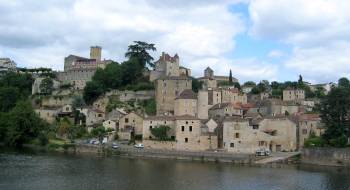
- Another charming old town, this one west of Cahors on the Lot river. There’s not a lot to do there, but I got two great photos and the town is the center for the local area. We had a nice lunch there at Le Fournil De L’Opera Bouffe, on the main street.
- Domme
- Yet another hilltop town, on the drive north into Perigord, This one is remarkable for its amazing view over the Dordogne. Also a great place to buy preserved foie gras.
- Les Eyzies de Tayac
- Our third home base on our trip, chosen mostly for its fantastic restaurant and proximity to Lascaux. I’m really glad we visited Lascaux: the reproduction is great and the art is truly amazing. Les Eyzies is the center of research into prehistoric man in France; the area is lousy with caves and artifacts. The Museum of Prehistory is a must see if you like seeing case after case of chipped rocks.
- Sarlat la Caneda
- A compact medieval city that’s also bustling with real people going about their lives. Definitely worth an afternoon’s walking around; I may stay here next time. Life seems good there.
- Toulouse
- The end of our time in the Southwest, France’s third largest city. I wish I could say I liked it more, but the crowds and busyness were an unwelcome contrast to our bucolic ambles in the countryside. It’s a very lively city though, with plenty of interesting things to do. I’d enjoy it more if I were in an urban mood.
Looking back on my notes, I see our trip was heavy with charming medieval towns. I guess that’s what I like to do best in France, just poke around the area and find interesting architecture, views, towns, etc. It seems to me people live pretty well in the countryside there.